|
Update
Applications
Advantages:
For developer:
(Пайпы программ)
Companies:
History:
(Бонусы)
Advice:
(Барьеры и решения)
Technologies:
(Применение в науке, лаборатории, ..)
Solutions
New eComStation:
Future:
(Ссылки на другие сайты)
(Картинка дня)
OS/2 artefacts:
Gadgets:
|
|
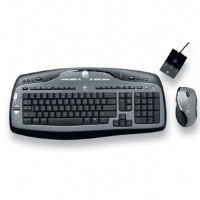
Logitech MX3000 Cordless Keyboard and Laser Mouse Desktop (MX600)
Mark: Good Mouse only works with the new amouse USBmouse.sys 8/06. The multimedia keys
on the key board don't work. Use /Device:1 on both the USB keyboard and
mouse drivers. On cold reboot the mouse and keyboard may fail unplugging
and repluging the wireless receiver corrects the problem.
I have a logitech MX3000. I use to experience the Alt key sticking but
it seemed to have resolved when I added /Device:1 to the usb keyboard driver.
/DEVICE:n Parameter is added to select which USB device to serve
in multidevice configurations (several keyboards devices attached to USB bus).
Información enviada por: Gregg Young -- 2006-08-29 16:58:34
****************************************
[GoogleAdv]
 eCo Software is participating in the conferences.
We made more than 15 presentations.
We published more than 10 reports.
|
Ideas for the developers:
|
DevCon: Is it easy to develop drivers for eComStation? Tutorials, templates of drivers and documentation
|
|
 |
IBM OS/2 Warp
|
|